In House IT vs Outsourced Managed IT for Small Businesses
At some point, the person who “knows computers” stops being enough. Password resets interrupt billable work. Wi-Fi issues slow down the team. A laptop fails right before a client deadline. Security updates get postponed because everyone is busy.
For small businesses with 5 to 50 employees, that is usually when the big question comes up:
Should the company hire a full-time IT person, or outsource support to a managed service provider?
The honest answer is that both models can work. In-house IT can be the right choice for larger or highly specialized companies. Outsourced managed IT can be a better fit for smaller teams that need reliable support, cybersecurity, monitoring, and planning without carrying the cost of a full internal department.
This guide breaks down the real costs, benefits, and tradeoffs so the decision is based on business needs, not guesswork.
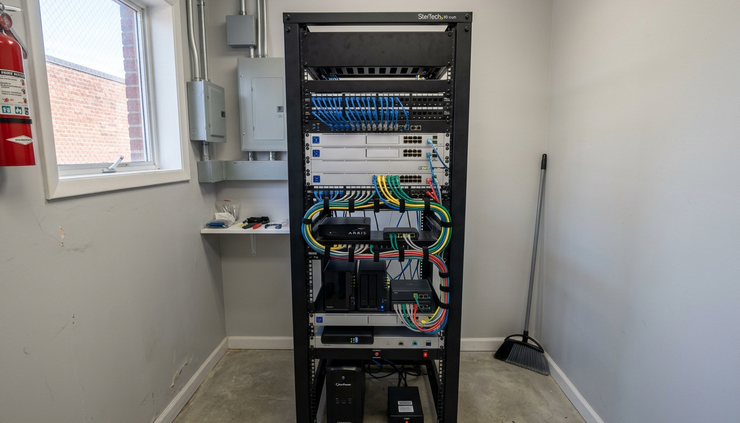
When in-house IT makes sense
There is a time and place for an internal IT department. Outsourcing is not the right fit for every company, and a managed service provider should be clear about that from the start.
Hiring full-time IT staff usually makes sense when the business has the size, complexity, or physical support needs to justify it.
The company has 100 or more employees
Once a business reaches around 100 employees or more, the volume of support requests can change quickly. More people means more devices, more software, more logins, more onboarding, more offboarding, and more daily issues.
At that size, paying for full-time salaries and benefits can make sense because there is enough work to keep an internal IT team busy. A larger business may also need internal coverage for multiple systems, locations, compliance requirements, and long-term infrastructure projects.
For a 5-person, 15-person, or 40-person company, that same math is harder to justify.
The business needs constant hands-on support
Some businesses rely heavily on physical technology that needs frequent, immediate attention. That could include specialized equipment, production machinery, point-of-sale hardware, or internal systems that cannot tolerate much downtime.
If someone truly needs to be on-site all day, every day, an internal hire may provide value that remote support cannot match. A managed IT provider can still support many on-site needs, but they are not physically sitting in the building every hour.
The environment is highly specialized
Some companies use niche systems that require deep knowledge of one specific workflow. In those cases, an internal IT person may be able to learn the company’s tools, staff habits, and internal needs at a level that is hard to match from the outside.
That dedicated focus is the strongest argument for in-house IT. The employee works for one company, inside one environment, with one set of priorities.
The hidden reality of in-house IT for small businesses
For small businesses, the in-house model often looks simple at first. Hire one capable person, bring support under one roof, and stop dealing with outside vendors.
The reality is more complicated.
A single IT employee rarely costs only their salary. The business also pays for payroll taxes, benefits, paid time off, training, equipment, software tools, management time, and recruiting costs if the person leaves.
That cost can be reasonable when the workload supports it. For many small businesses, it creates a heavy fixed expense before the company actually needs a full-time IT role.
Cost area | In-house IT | Outsourced managed IT |
Labor | Full salary, taxes, benefits, and time off | Monthly service fee based on agreement |
Coverage | Limited to one person or a small team | Access to a broader support team |
Availability | Gaps during vacation, illness, or turnover | Coverage is built into the provider model |
Tools | Business may need to buy monitoring, security, and ticketing tools | Tools are often included or bundled |
Skills | Depends on the person hired | Shared access to multiple skill sets |
Scalability | New hires may be needed as the company grows | Service can usually grow with the business |
The biggest issue is not just cost. It is dependency.
If one person handles everything, that person becomes a single point of failure. They know the passwords, the network setup, the backup process, the vendor contacts, and the unfinished projects. If they leave, get sick, or take vacation during a crisis, the business may be exposed.
That does not mean internal IT is bad. It means small companies need to understand the risk of putting the entire technology function on one person’s shoulders.

What outsourced managed IT actually includes
Outsourced managed IT is more than calling someone when a computer breaks. A good managed service provider, often called an MSP, takes ongoing responsibility for the health, security, and support of the company’s technology environment.
The exact service mix depends on the provider and the plan, but managed IT often includes:
Help desk support for employees
Device monitoring and maintenance
Security updates and patching
Antivirus or endpoint protection management
Backup monitoring
Microsoft 365 or Google Workspace administration
Network support
Vendor coordination
Cybersecurity guidance
IT planning and budgeting
New employee setup and employee exit support
The goal is to reduce surprise problems. Instead of waiting for technology to fail, the provider watches systems, handles routine maintenance, and supports employees when issues come up.
That is why outsourced managed IT often fits small businesses well. A company gets access to a team without hiring a full department.
The cost difference is not just salary versus monthly fee
Many businesses compare managed IT against the salary of one internal hire. That is only part of the picture.
A fair comparison should include the full cost of each model.
The true cost of an in-house hire
A full-time IT employee may require:
Base salary
Payroll taxes
Health insurance and benefits
Retirement contributions, if offered
Paid time off
Training and certifications
Laptop, phone, and tools
Recruiting fees or hiring time
Replacement costs if the employee leaves
There is also management overhead. Someone has to supervise the IT employee, review their work, approve projects, set priorities, and assess security decisions. For a small business owner, that can become another job.
The true cost of managed IT
Managed IT usually works as a predictable monthly expense. Pricing can vary based on the number of users, devices, locations, security needs, and service level.
The monthly fee may look higher than “just calling someone when needed,” but the comparison is different. Break-fix support reacts to problems after they happen. Managed IT is built around ongoing care, monitoring, and support.
That means the value comes from fewer disruptions, better planning, faster support, and less time spent chasing vendors or troubleshooting problems internally.
For many small businesses, predictable monthly cost is one of the main benefits. It makes IT easier to budget and easier to explain.
The strongest advantages of outsourced managed IT
For a 5 to 50 employee business, outsourced managed IT often provides a wider range of skills than one internal person can bring.
Access to a team instead of one generalist
A single IT employee may be good with workstations, but weaker in cybersecurity. Or strong with cloud tools, but less experienced with firewalls and networking.
An MSP usually has multiple technicians with different strengths. One person may handle help desk issues. Another may work on servers or cloud systems. Another may focus on security and policy.
That broader coverage matters as threats and systems become more complex.
Better continuity when someone is unavailable
If the internal IT person is out, support can stop. If an MSP technician is unavailable, another technician can often pick up the ticket.
That is a major operational advantage. Small businesses do not usually have the luxury of waiting several days for basic support.
Built-in tools and processes
Managed service providers typically use professional tools for monitoring, patching, ticketing, remote access, documentation, and security. These tools help track what is happening across the environment.
A small business could buy those tools for an internal hire, but that adds cost and complexity. With an MSP, the tools are usually part of the service model.
Better planning
A good provider does not only fix problems. They help plan upgrades, review risks, and create a technology budget.
That might include replacing aging computers before they fail, checking backups, preparing for software renewals, or improving account security.
For many small businesses, this planning is where real value appears. Technology stops feeling random.

The drawbacks of outsourced managed IT
Managed IT is useful, but it is not perfect. A candid comparison should include the downsides.
The provider is not sitting in the building
Remote support can resolve many issues, but not all of them. Hardware swaps, cabling problems, printer jams, and some network outages may require an on-site visit.
Many MSPs offer on-site support, but it may not be instant. If the business needs someone physically present at all times, outsourcing may not be enough.
The relationship needs clear expectations
Managed IT works best when the agreement is clear. Response times, included services, after-hours support, project work, and security responsibilities should be spelled out.
Without clear expectations, both sides can get frustrated. The business may assume something is included, while the provider treats it as a separate project.
Before signing, ask what is included, what costs extra, and how urgent issues are handled.
Not every MSP is the same
Some providers are highly organized and security-focused. Others are reactive and hard to reach.
A poor MSP can create many of the same problems as poor internal IT. Slow tickets, unclear documentation, weak communication, and vague billing can make outsourcing painful.
The provider matters as much as the model.
The strongest advantages of in-house IT
In-house IT still has real strengths, especially when the role is properly funded and supported.
Deep knowledge of the business
An internal employee learns the company’s habits, personalities, systems, and recurring pain points. They see issues as they happen and can often spot patterns quickly.
That context can be helpful, especially in companies with unusual workflows.
Immediate physical access
If a device fails or a cable needs to be checked, an internal person can walk over and inspect it. That immediacy can save time in environments where physical equipment is central to daily work.
Direct control over priorities
With an employee, the company can set priorities directly. There is no service contract to interpret and no shared provider schedule to work around.
That can be useful for fast-moving companies with frequent internal projects.
The drawbacks of in-house IT
The weaknesses of in-house IT are usually most visible in small businesses.
One person cannot be an expert in everything
Modern IT covers a lot of ground. Cybersecurity, networking, identity management, cloud platforms, backups, endpoint protection, compliance, and user support all require different skills.
One person may be capable, but no one is strong in every area.
Hiring is difficult
Good IT talent can be hard to recruit and retain. Small companies may struggle to compete with bigger employers on salary, benefits, career path, and training opportunities.
If the employee leaves, the company may lose key knowledge at the worst possible time.
Security can become reactive
Small businesses face real cybersecurity risk, even when they are not obvious targets. Attackers often look for weak passwords, unpatched systems, exposed remote access, and poorly protected email accounts.
An internal generalist may not have enough time or experience to build a strong security program. That gap can grow quietly until something goes wrong.
A practical way to choose
The best choice depends on company size, risk, budget, and operating needs. To make the decision clearer, look at how the business actually uses technology.
Choose in-house IT when | Choose outsourced managed IT when |
You have 100 or more employees or enough work for full-time IT staff | You have 5 to 50 employees and need broad support without hiring a full team |
You need constant physical, hands-on help | Most issues can be handled remotely, with on-site visits as needed |
Your systems are highly specialized and unique | You use common business tools like Microsoft 365, Google Workspace, cloud apps, laptops, and standard networks |
You can afford salary, benefits, tools, training, and backup coverage | You prefer predictable monthly costs and access to a wider team |
You already have strong security leadership | You need help building and maintaining basic cybersecurity practices |
For many small businesses, the best answer is not permanent. A company may start with an MSP, then add an internal IT manager later as it grows. Some larger small businesses use a hybrid model, with one internal point person supported by an outside provider.
That can work well. The internal person manages priorities and company knowledge, while the MSP handles monitoring, security, ticket overflow, and specialized work.

What Aegis recommends for small businesses
At Aegis, the honest recommendation for most 5 to 50 employee businesses is to start by comparing outcomes, not job titles.
The real question is not “Should we hire a tech person?” The better question is:
What level of support, security, planning, and reliability does the business need, and what is the most cost-effective way to get it?
If the company needs one person physically present all day, in-house IT may be the right call. If the company needs consistent support, better security, professional tools, and access to a team, outsourced managed IT is often the stronger fit.
For many small businesses, managed IT provides the coverage they need at a cost they can plan for. It also reduces the risk of depending on one employee for every password, patch, backup, and emergency.
The smart path is to map the business’s actual needs first. Count users, devices, locations, key software, compliance requirements, support pain points, and security concerns. Then compare the full cost of hiring against the full value of managed service coverage.
Good IT should make the business calmer, safer, and easier to run. Whether that comes from an internal hire, an outsourced provider, or a mix of both, the decision should serve the company’s size and stage, not someone else’s sales pitch.
Comments